
Your day, in order
See tomorrow, not just the last order that came in
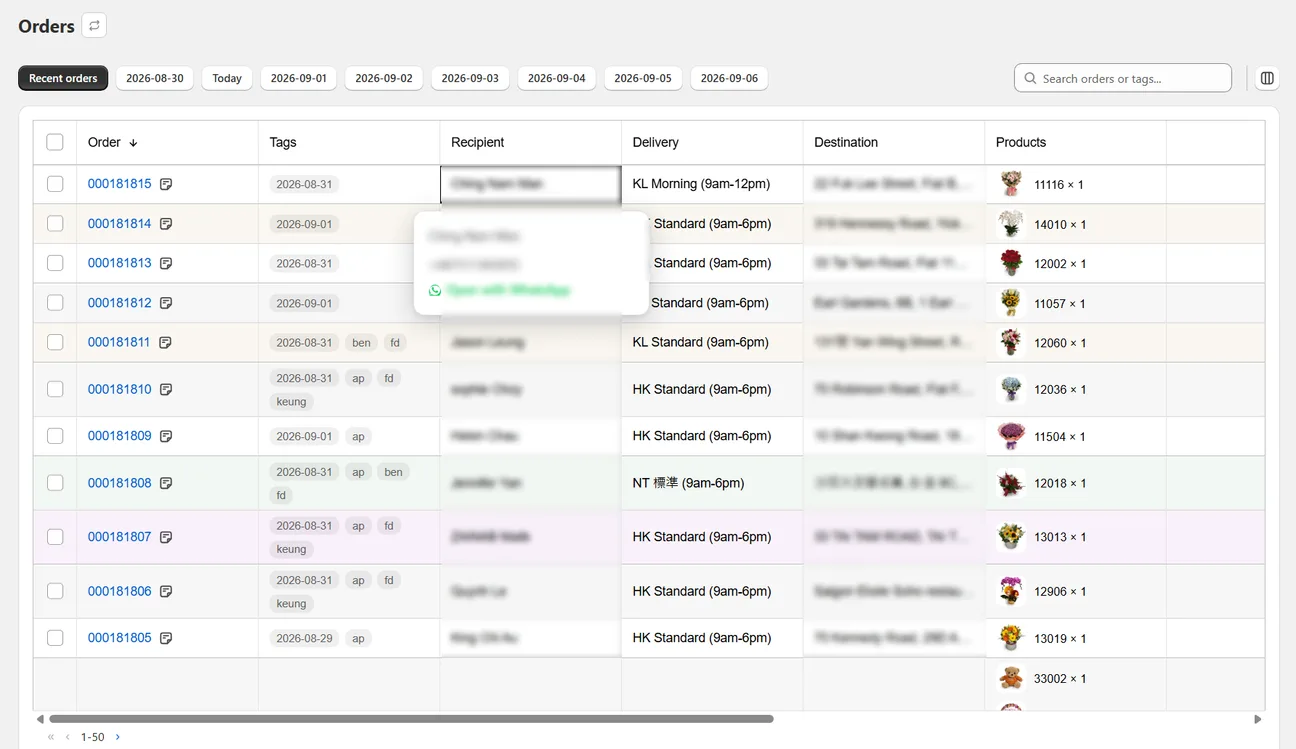
Shopify lists orders by when they were placed. Wunder Delivery groups them by the day you have to deliver, with the products, addresses and messages already on screen.
How it helps
A clearer way to keep work moving.
The hardest part of a delivery morning is working out what today actually contains. Your orders arrive in the order people bought them, and the delivery date is buried in a corner of each one. Wunder Delivery reads that date and builds the day around it, so the first thing you see when you open the app is the work in front of you.
- Pick a day and see only that day’s deliveries
- Recognise orders by their product photos, not their numbers
- Filter by time slot, area or delivery method
- See what still needs printing, assigning or delivering, counted for you
How it works
Three steps from information to action.
Pick the day
Today, tomorrow, or any date within your plan’s window.
Scan the list
Product photos, delivery method and any missing details, at a glance.
Act without losing your place
Print, tag or assign a driver, then carry on where you were.
Spend less time processing orders and more time delivering them.
Bring delivery-date orders, printing, invoices and driver hand-offs into one Shopify-connected workflow.