Order management
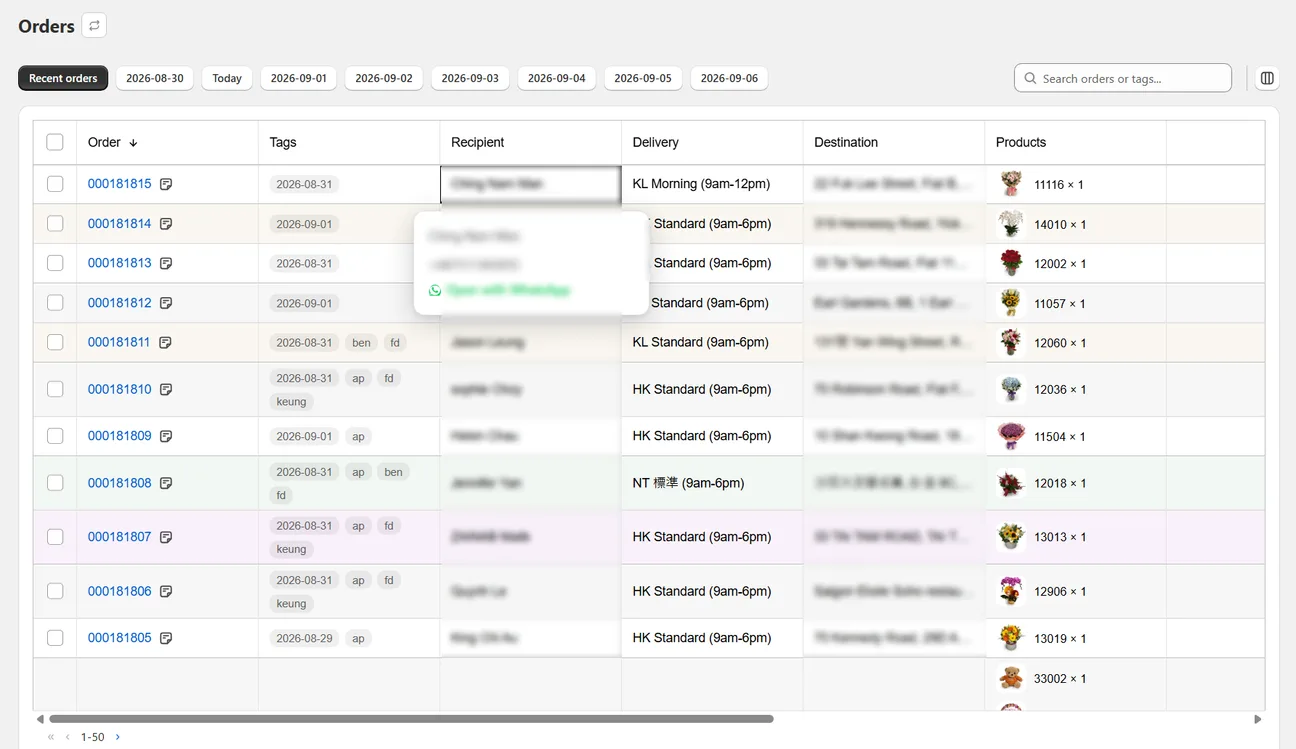
Shopify lists orders by when they were placed. Wunder Delivery groups them by the day you have to deliver, with the products, addresses and messages already on screen.
Explore order management → WunderDelivery
Built for Shopify merchants who deliver locally
See tomorrow’s orders grouped by delivery date. Print the cards, envelopes and dispatch sheets. Give each driver their own list. All inside Shopify, without a spreadsheet in sight.
Why this exists
If you deliver locally, six things go wrong every week — and none of them are Shopify's fault. It was never built to run a delivery round.
Pick a day and see exactly that day’s deliveries, with the products, the addresses and the messages already on screen.
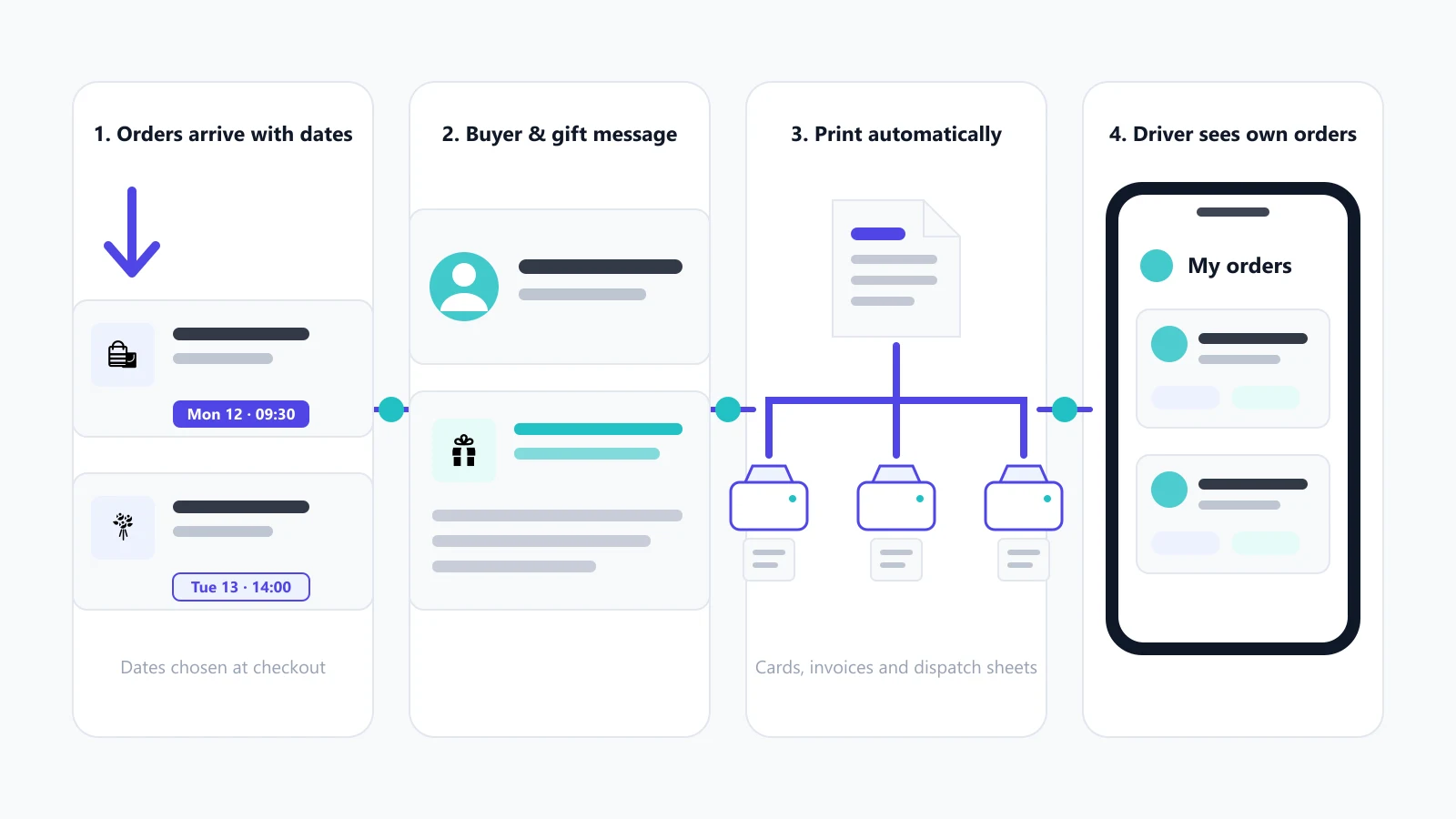
Wunder Delivery reads the date your app already collects and builds the day around it. Your customers are never asked twice.
Proper fields at checkout, one printed card per message, and messages you can correct before they print.
The buyer’s own name and number are captured separately, so you always know who to call.
Send each document to its own printer in one click — or have orders print themselves as they arrive.
Each driver opens their own list on their phone, sees only their stops, and marks them done as they go.
One app, not five
Most delivery shops end up running a date picker, a gift-message app, a printing app, something for drivers and a spreadsheet to hold it together. Wunder Delivery does the operational half of that in one place.
You keep the checkout app your customers already use to pick a date — Wunder Delivery reads it rather than replacing it. Everything after checkout happens here.
What you get
Your Shopify order stays exactly where it is. Everything here sits on top of it.
Shopify lists orders by when they were placed. Wunder Delivery groups them by the day you have to deliver, with the products, addresses and messages already on screen.
Explore order management →Collect the gift message properly at checkout instead of in a note, keep the buyer’s own name and number separate from the recipient’s, and fix a typo before it prints.
Explore gift messages →Cards, envelopes, dispatch sheets, invoices and receipts, printed from your Shopify orders — to one printer or several, by hand or automatically.
Explore printing →Each driver opens a web page on their phone, signs in with their own number, and sees the deliveries assigned to them — and nothing else in your shop.
Explore driver portal →Wunder Delivery can read an order before it prints and flag an address that looks incomplete, or translate one written in another language. These features are in early access.
Explore ai checks →Printing
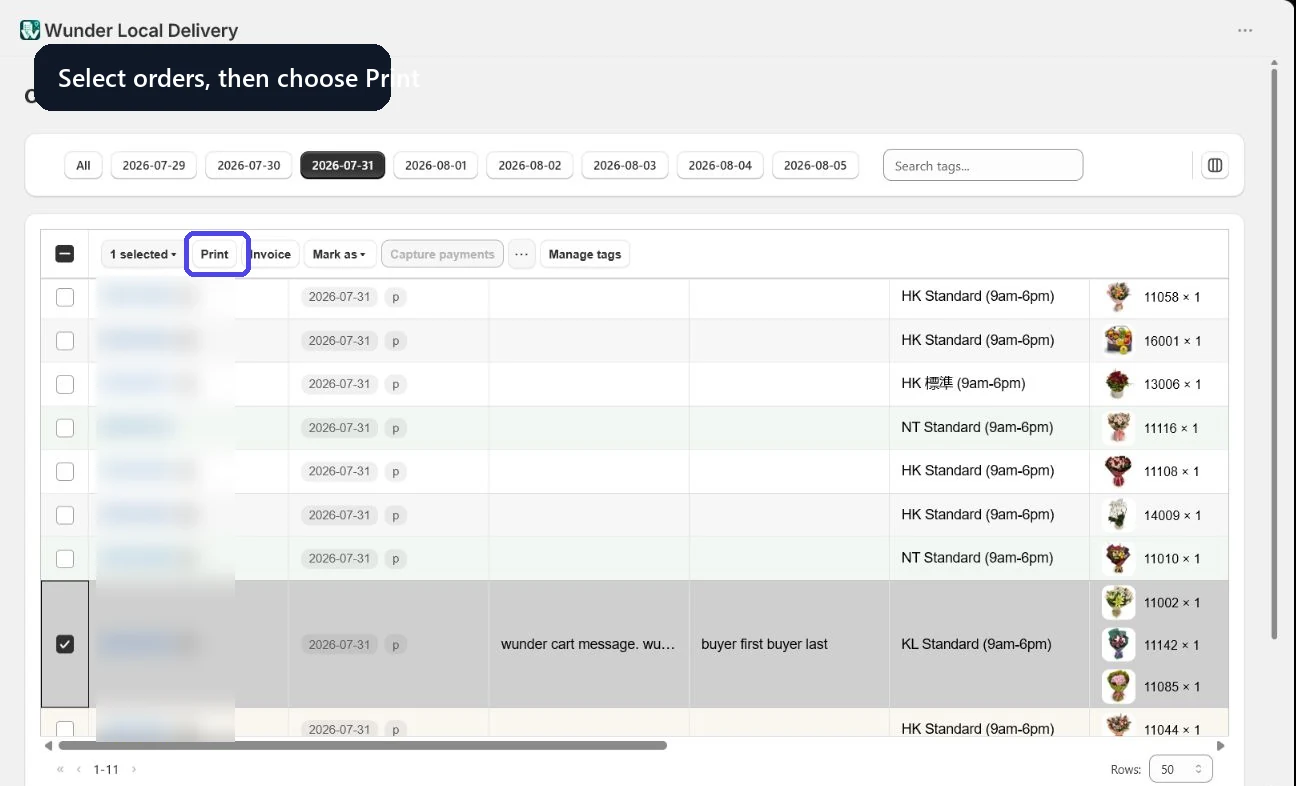
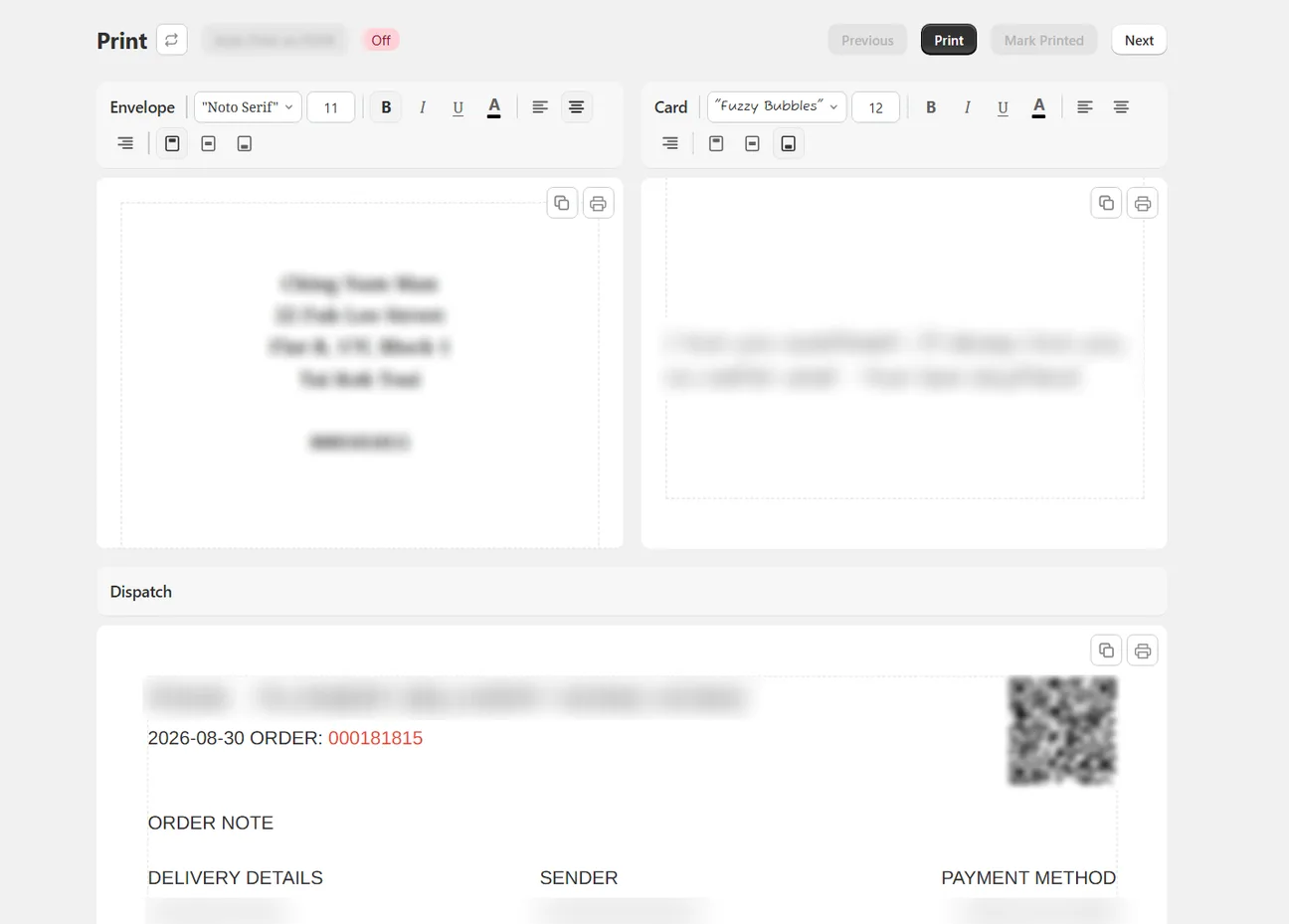
Three documents come out of every order: the dispatch sheet your team packs from, the envelope, and the card carrying the gift message. How they reach paper is up to you.
Select the orders you are printing — usually all of today.
Each message gets its own card, and you can fix a typo before it prints.
One click sends each document to its own printer. No dialog per sheet.
On Automate, new orders print as they arrive.
Early access · optional
A missing flat number found after dispatch costs you a second delivery. Wunder Delivery can read an order before it prints and flag an address that looks incomplete — or translate one written in another language.
AI features are in early access — they work, but their behaviour and limits are still changing.
How the checks workThis address may be missing a flat number. Compare it with the original order before dispatch.
Driver portal
Each driver opens a web page on their phone and signs in with their own number. They see their stops for today — and nothing else in your shop.
Recipient details, shown only to the assigned driver
Recipient details, shown only to the assigned driver
Recipient details, shown only to the assigned driver
Works with what you have
Your customers pick a date at checkout the way they always have. Wunder Delivery reads what your app saved and builds the day from it — no change to your storefront, no second date picker.
Wunder Delivery reads the delivery date, time and location your customers already choose through Zapiet.
View integration →Bring the dates and time slots your customers pick through Pickeasy into your daily delivery view.
View integration →Use the delivery dates collected through Bird to organise printing and dispatch.
View integration →Read the delivery details Stellar collects and put them where your team is working.
View integration →Who uses it
Timed deliveries, card messages and a driver round, all on the busiest days of the year.
Wunder Delivery for florists →Celebration orders grouped by the day they are collected or delivered, with the personalisation attached.
Wunder Delivery for bakeries →Keep the sender and the recipient straight, and print a card that reads the way the customer wrote it.
Wunder Delivery for gift shops →Detailed orders with several printed pieces each, on a local delivery schedule.
Wunder Delivery for hampers →Filter by time slot and area, then hand each driver a round they can follow on their phone.
Wunder Delivery for food delivery →Local delivery, collection, paperwork and drivers in one place instead of four.
Wunder Delivery for local retailers →Pricing
Every plan covers the daily workflow — the day view, gift messages, printing, invoices and the driver portal. Higher plans raise the order allowance and add multi-printer and automatic printing.
For a shop doing a delivery round most days and printing from one computer.
For a shop with more than one printer and a week to plan ahead.
For a shop that wants orders on paper before anyone has opened the app.
For an established operation with a large round and a full driver roster.
Before you ask
No. Your orders, products, customers and payments all stay in Shopify exactly as they are. Wunder Delivery reads those orders and adds the working layer around them — the day view, the printing, the drivers.
No. It was built around florists, who have the hardest version of the problem, but it suits bakeries, gift shops, hamper businesses, food delivery and any Shopify shop doing local delivery or collection.
No. Your customers pick a delivery date the way they always have. Wunder Delivery reads what your existing app saved rather than asking them again.
Yes, from the Growth plan — one click sends the card, the envelope and the dispatch sheet to whichever printer handles each. Printing one document at a time works on every plan.
No. Drivers open a web page on their phone and sign in with their own number. They see the orders assigned to them and nothing else in your shop.
More in the full FAQ, or the help centre if you want the step-by-step version.
Bring delivery-date orders, printing, invoices and driver hand-offs into one Shopify-connected workflow.