
The dispatch map
See the day's deliveries and your drivers on a map — pinning stops, following a round, and what a driver position actually means.
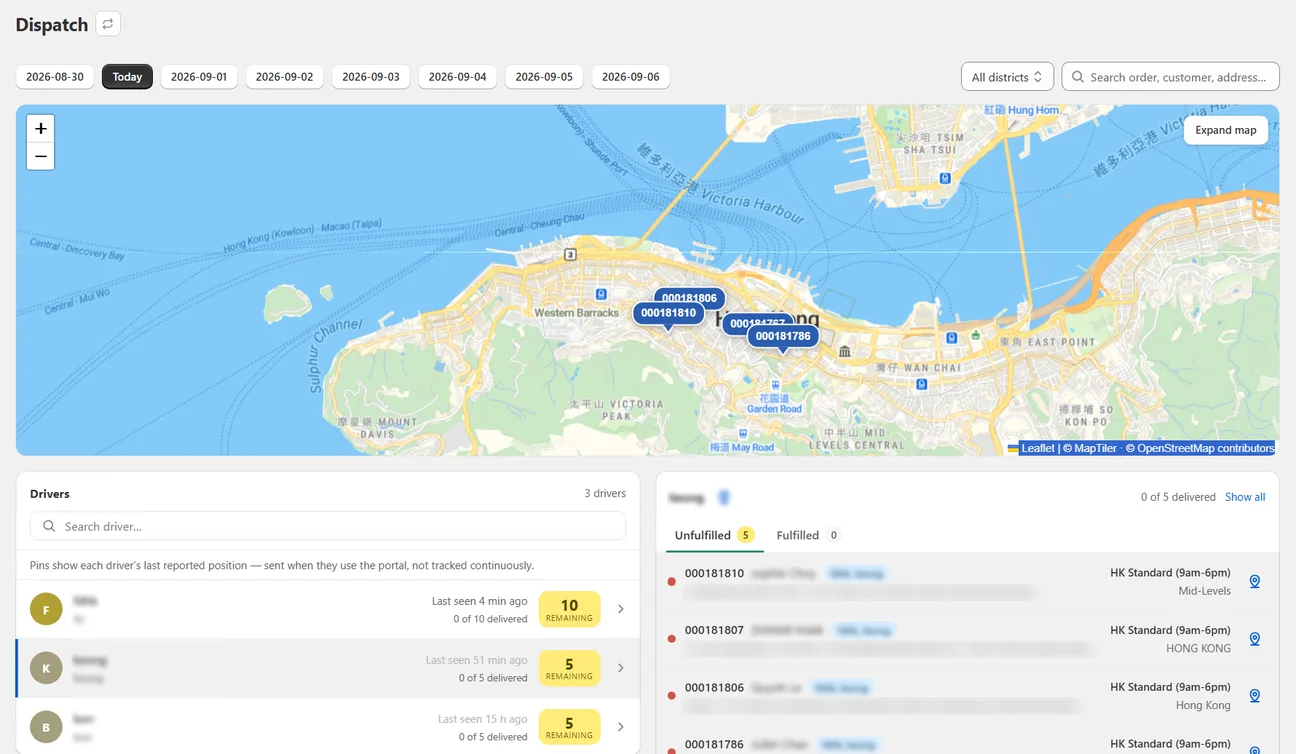
The Dispatch page is a live view of one delivery day: a map in the middle, your drivers down one side, and the day’s orders down the other.
Choosing the day
The same date chips as everywhere else. The board loads the whole selected day, including deliveries that are already done — it shows each driver’s progress as delivered / total, so completed stops have to be counted.
The drivers panel
A driver with nothing assigned for the selected day does not appear in the list and has no pin on the map. This is not a fault — there is simply nothing to show. If a driver is missing, check whether any of that day's orders carry their tag.
The exception is a driver you have already selected: they stay pinned to the top of the list even on a day they have nothing on.
Click a driver to scope the orders panel to their whole round. You are also offered a jump to their last reported position.
What a driver position means
A driver's location is sent only when they bring the portal to the front on their phone. There is no continuous tracking, no background location and no trail. A pin means "this is where they were when they last opened the app", which might be twenty minutes ago.
Use it to get a rough sense of where a round has reached. Do not use it to tell a customer their driver is five minutes away.
Driver pins need Growth or above. The map itself, and the order pins, are on every plan.
Pinning stops
Click any order row to drop its pin on the map. You can pin several at once. Each pin’s popup shows the recipient, the address, a phone number with a WhatsApp link, and which driver it belongs to.
A delivered stop pins in a different colour, and if it completes while pinned the pin updates itself.
The button beside the selected driver’s name pins or unpins their entire round in one go.
Turning an address into map coordinates is done one address at a time, when you click its row. The pin-everything button deliberately does not trigger a burst of those lookups, so any address you have never pinned individually is skipped without a message.
If a stop is missing from a pinned round, click its own row once. It will resolve and appear.
Keeping current
The board updates itself as orders change — no reloading needed. There is a refresh button in the header if you want to force it.
Next
Still stuck? Ask us about this page and we will answer directly.