
Reading gift messages and buyer details on an order
Where the message, the sender and the recipient appear in the app — and why buyer and recipient are kept deliberately separate.
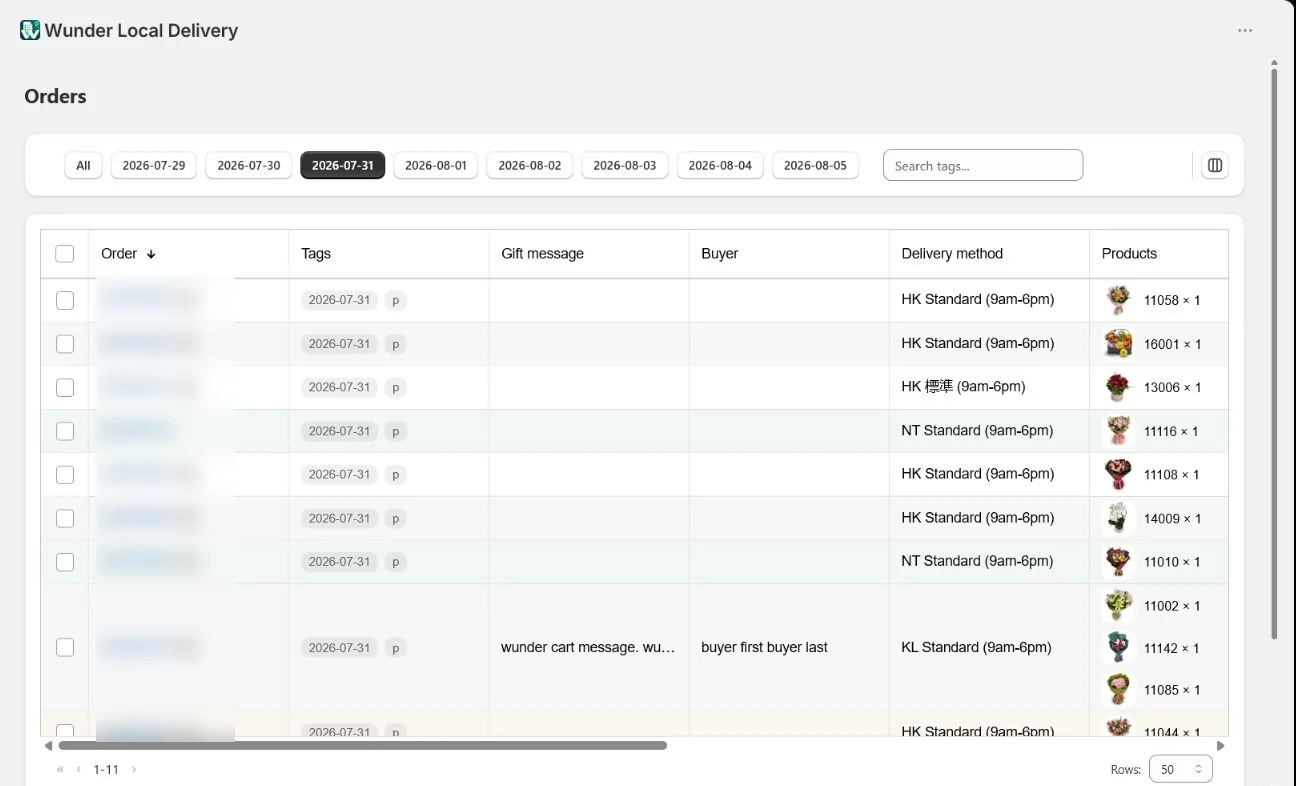
Once the blocks are collecting information, it appears throughout the app.
On the orders list
Turn on the Buyer, Buyer phone and Gift message columns from the columns control. Long values show a short version in the cell and the whole thing in a hover panel.
The gift message also replaces the order-note icon on the order column, so you can see at a glance which orders carry one.
Buyer and recipient are different people
This is the distinction the whole feature exists for.
- The buyer is who paid. Their name and phone come from the Buyer details block.
- The recipient is who receives the delivery. Their name, address and phone come from the shipping address.
They are stored separately and never merged. When something goes wrong with a delivery you need to call the person who placed the order, not the person waiting for a surprise.
The phone number in a Shopify shipping address belongs to the delivery. On a gift order that is the recipient. Ringing it to ask about the order tells the recipient there is a gift coming.
Three kinds of message
An order can carry all three at once:
- Product messages — one per product, from the product page block (Growth and above)
- A cart message — one for the whole order, on every plan
- The Shopify order note — whatever your customer or staff typed there
Each prints on its own card. See printing a day’s orders for how the card deck works.
Each kind of message has its own variable in the card template. A template without the product-message variable will not print product messages, even though you can see them on the order.
On the dispatch sheet and the invoice
The dispatch sheet — the document your team packs from — shows the gift message so the right card goes with the right arrangement.
The invoice deliberately does not. It is the document your customer reads, and reprinting the message next to the price is rarely what anyone wants.
Next
Still stuck? Ask us about this page and we will answer directly.